
What is Remini used for?
Remini is the go-to tool for users who need to "rescue" unusable media:
-
Old Photo Restoration: Breathing new life into faded, scratched, or grainy family heritage photos from the pre-digital era.
-
Portrait Enhancement: Sharpening out-of-focus or motion-blurred selfies to make them social-media ready.
-
Video Upscaling: Improving the resolution and clarity of shaky or low-res home videos on a frame-by-frame basis.
-
Professional Content Prep: Helping photographers and e-commerce sellers upscale low-resolution product shots or headshots for marketing materials.
Remini Alternatives
If you need broader editing tools or a different pricing structure, consider these alternatives:
-
Topaz Photo AI: The professional's choice for desktop-based, high-end sharpening and noise reduction without the "AI-generated" look.
-
YouCam Enhance: A strong mobile alternative that offers similar one-tap 4K upscaling and color correction.
-
Fotor: An all-in-one editor that combines basic AI enhancement with a full suite of graphic design and filter tools.
-
Adobe Lightroom: For photographers who prefer manual control over lighting and color rather than automated AI reconstruction.
Features
Remini’s power lies in its automated, "intelligence-first" features:
-
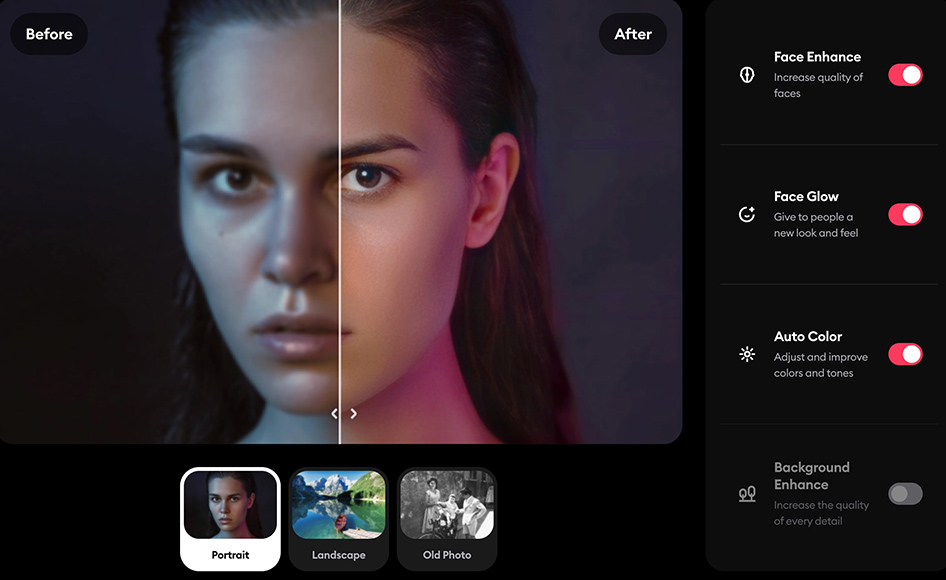
Face Enhancer: Its flagship technology that detects faces and reconstructs them with stunning realism, even when the original is almost unrecognizable.
-
Old Photo Restorer: Automatically removes scratches, corrects color fading, and denoises grainy textures from physical photo scans.
-
Video Enhancer: One of the few mobile-accessible tools that can apply temporal AI sharpening to video files, reducing motion blur.
-
AI Avatars & Profiles: A creative suite that allows users to generate professional-looking headshots or stylized avatars from casual snapshots.
-
Background Enhancer: Ensures that it’s not just the person who looks clear; it sharpens the environment and background textures to match the high-res subject.
Pricing
Remini operates on a "freemium" model with a focus on weekly or monthly subscriptions:
-
Free Version: Heavily restricted. Users can process a few photos per day but must watch multiple ads per image, and results often carry a watermark.
-
Remini Pro (Weekly/Monthly): Approx. $4.99 - $9.99/week. Unlocks unlimited photo enhancements, removes ads, and provides access to specialized "Pro" filters.
-
Remini Business (Web): Starts around $25/month. Aimed at professional workflows, offering batch processing and API access for larger scale operations.
Integrations
As a specialized tool, Remini is primarily a standalone destination, but it offers these connections:
-
Cloud Storage: Native support for importing from and exporting to Google Photos, iCloud, and Google Drive.
-
Social Media: Direct "one-click" sharing to Instagram, TikTok, and Facebook once an enhancement is completed.
-
Web API: For businesses, Remini provides an API that can be integrated into existing e-commerce or photography platforms to automate image upscaling.
Support, Customer Service, and Training Options
-
Help Center: A comprehensive Zendesk-powered knowledge base covering subscription management and technical troubleshooting.
-
In-App Tutorials: Brief, interactive guides that show users how to get the best results from different photo types (e.g., portraits vs. landscapes).
-
Direct Support: Email-based support for subscribers, typically focusing on billing and account recovery.
Pros & Cons
| Category | Pros (The Good) | Cons (The Bad) |
| Performance | Incredible Clarity: Often achieves results that seem "magical" compared to traditional sharpening. | Processing Speed: High-definition video or batch photo tasks can be slow and server-dependent. |
| Ease of Use | One-Tap Magic: No technical skills required; the AI handles everything automatically. | Limited Control: You cannot manually "paint" where the AI should or shouldn't enhance. |
| Face Accuracy | Best-in-class at reconstructing eyes and facial features in portraits. | Over-Smoothing: Can sometimes make faces look "too perfect" or slightly artificial/plastic. |
| Versatility | Available on iOS, Android, and Web, with cross-platform sync for Pro users. | Niche Focus: Excellent for people/faces, but less effective for complex landscapes or text. |
| Pricing Model | Weekly subscription options are great for "one-off" restoration projects. | Ad-Heavy: The free experience is frustratingly interrupted by long, unskippable advertisements. |
Remini is the undisputed leader for personal photo restoration. If you have a blurry photo of a loved one or a grainy vintage scan, there is no tool that will "guess" the missing details more accurately than Remini.
However, professionals should be wary of the "AI-look" that can sometimes strip away the original character of a photo. It is a powerful restoration tool, but it is not a replacement for a full-scale editor like Photoshop. For most users, a one-month subscription is the best way to clean up a lifetime of old memories.
Editor’s Rating: 8.5/10
"Remini remains the industry benchmark for facial reconstruction, turning 'lost' memories into high-definition reality with a single tap."