
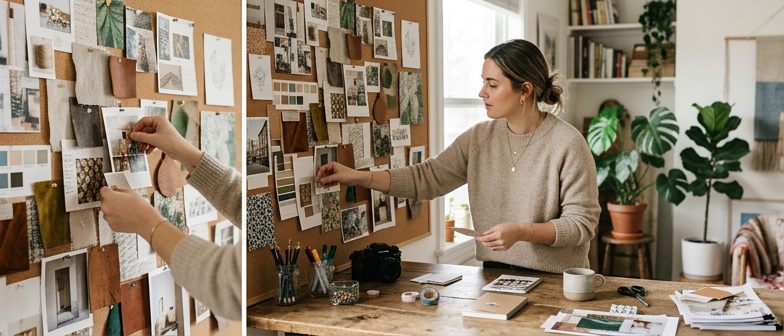
What Prompt Moodboard Planning Actually Is
Prompt Moodboard Planning is a structured way to move from a vague idea in your head to clear, prompt-ready direction for AI and creativity work. Instead of jumping straight into a detailed prompt, you first collect images, color palettes, textures, and short Creative Direction Notes that express the feeling or narrative you want. This borrows from traditional art direction basics, but is tailored to how image models respond to visual themes, style cues, and descriptive language. The moodboard becomes a bridge between your initial concept and the specific wording you will use, helping you see which elements truly define the look and which details are optional.
In practice, you treat the board as a living guide for every prompt in a project or scene. As you refine your Visual Reference Selection and adjust notes about lighting, camera angles, or design eras, you learn what reliably supports your intent. When you finally write prompts, they become informed decisions backed by a visual plan instead of random guesses. For the rest of the article, this idea of prompt-led moodboard work is the foundation for organizing art direction and building a repeatable, AI-friendly Style Match Workflow.
From Idea to Visual Direction
Turning a loose idea into clear visual direction starts with unpacking the creative intention behind it. Before writing prompts, note the emotion you want, the response you are after, and where the image will appear. These early creative direction notes clarify whether the tone is playful, cinematic, minimal, or restrained, and whether the visual strategy should highlight concept illustration, product clarity, or atmosphere. Naming these choices in plain language gives both you and the AI model a stable anchor before you think about style or technical details.
Once the intention is defined, translate it into a simple visual strategy that links ideas to concrete traits such as color, composition, and lighting. Capture this as short art direction phrases like muted colors with strong silhouettes or bright, close-up framing that feels personal. Use these notes to filter every reference you add to a prompt moodboard, asking whether it supports the mood and message you want. This keeps your visual direction consistent even when you explore very different looks.
With strategy in place, shape prompts that turn conceptual language into instructions an AI model can follow. Start with one sentence that states the core intent, then add a few visual cues such as camera angle, setting, and realism. Guide the model toward a coherent direction rather than overcontrolling details, and review outputs against your original notes. This loop between written intention, structured art direction, and prompt refinement closes the gap between rough idea and repeatable visual results.
| Step | Main Action | Key Questions | Output for AI Prompt |
|---|---|---|---|
| 1. Clarify intention | Write creative direction notes | What emotion and response do I want? | One-line goal and tone summary |
| 2. Define visual strategy | Translate idea into color, composition, lighting | Which traits carry the message best? | Short art direction phrases |
| 3. Curate references | Filter images against intention and strategy | Does this reference support mood and message? | Focused prompt moodboard |
| 4. Draft first prompt | Turn notes into a simple scene description | What must appear in the frame? | Single-sentence core prompt |
| 5. Refine with feedback | Compare outputs to original notes | Where does the image drift from the plan? | Adjusted prompt and updated notes |
Writing Creative Direction Notes That AI Can Follow
When you plan a prompt moodboard, write creative direction notes as a compact guide for an assistant that cannot guess context. State the goal in one sentence, then define subject, setting, mood, and intended use in short, plain lines. Replace vague ideas like cool or epic with specific visual cues such as soft window light, a muted blue palette, or a busy street at dusk so AI tools can match your intent.
Keep your notes ready for prompts by treating them as a lightweight art brief instead of a loose stream of thoughts. Group details into simple sections for visual references, style, and composition, and skip tool jargon unless essential. Capture a few must have elements and a small set of optional details so the system can explore variations without drifting away from your core direction.
Choosing and Using Visual References
Effective visual reference selection starts with a clear intention for your prompt moodboard planning. Before you save any image, decide what the board must communicate, such as mood, lighting, composition, or subject matter, and pick visuals that serve only those priorities. In an AI and creativity workflow, a small set of focused images usually guides the model better than an overloaded board. Choose references that clearly show traits you plan to mention in prompts, like camera angle, color palette, or level of detail, so every asset has a defined role.
Treat this curated set as an early stage of art brief organization rather than a loose collage. Group images by function, such as character, environment, texture, or typography, and add short labels that explain what each cluster contributes. Instead of pinning a portrait without context, tag it with notes like warm side lighting or shallow depth of field so your creative direction is explicit. This structure makes it easier to translate visual cues into language and keeps the board aligned with your original goals instead of drifting into visual noise.
As you refine the board, keep checking whether each image still supports the direction of your prompts. Remove visuals that duplicate the same idea or pull the style off-course, and add brief comments about what should be carried into the final wording, such as muted colors, clean negative space, or dynamic perspective. Used this way, moodboards become a practical bridge between what you see and how you describe it, supporting consistent, reusable style guides across different projects.
A Style Match Workflow for AI Image Tools
A simple style match workflow starts with focused visual reference selection before you write any prompts. Collect a small set of images that clearly express the mood, color palette, composition, and level of detail you want, instead of saving many loosely related pictures. For each reference, note what actually matters for your Prompt Moodboard Planning, such as lighting direction, camera angle, texture treatment, or character design, so you can separate essential traits from incidental details that do not need to be copied.
Once your references are organized, test them in your AI image tool with short prompts that keep content primary and style secondary. Begin with a neutral description of the subject and scene, then add a brief style note that echoes your visual choices, adjusting one control at a time to see how closely the results match your visual reference selection. This structured iteration gives you a repeatable way to match tone without overfitting to a single image, keeping prompts flexible while still aligned with a consistent look.
Building and Refining Scenes With Prompts
Once prompt moodboard planning is complete, turn scattered references into a clear scene description. Summarize what should be happening in the image, including subject, action, setting, and mood. Translate each key visual reference into short phrases covering camera angle, lighting, color temperature, and texture. This keeps the creative direction concrete and ties every part of the scene to deliberate choices instead of vague stylistic guesses.
Effective scene building also depends on how information is organized inside the prompt. Begin with the core subject and action, then layer in environmental details like time of day, location, and atmosphere, followed by style notes that reflect your visual reference selection. Group related ideas so you can adjust one aspect of the image at a time. Treat this structure as part of your workflow for matching styles, so future scenes using the same direction can reuse the same ordered pattern of elements.
Refining an image concept works best as a series of controlled iterations rather than full rewrites. After each generation, compare the result to your moodboard and creative direction notes, then decide which single factor to adjust, such as composition, color balance, or subject emphasis. Add or remove a few targeted words to nudge the model and keep a simple record of these changes. Over time, this disciplined approach turns loose ideas into a consistent method for image concept refinement across multiple scenes.
Q&A
-
What is prompt moodboard planning in an AI image workflow?
It is collecting reference images, colors, textures, and short notes so the AI follows a clear visual direction instead of a vague idea before you write prompts. -
How do I choose visual references without overloading the board?
Decide what must be clear—mood, lighting, composition, or subject—then pick a few images that each show one priority, skipping near-duplicates or loosely related styles. -
How can I write creative direction notes AI tools understand?
Use one sentence for the goal, then brief lines for subject, setting, mood, and use case, with specific cues like “soft side light” or “muted blue palette,” not vague labels. -
What is a simple style match workflow for AI image tools?
Start with a handful of focused references, list which traits matter—lighting, texture, character design—and mention only those in prompts, ignoring incidental details. -
How do I turn my moodboard into clear scene prompts?
Write one sentence with subject, action, and setting, then add short phrases for camera angle, light, color temperature, and texture taken from your visual references.