
The Logic of the Node (And Why You’ll Never Go Back)
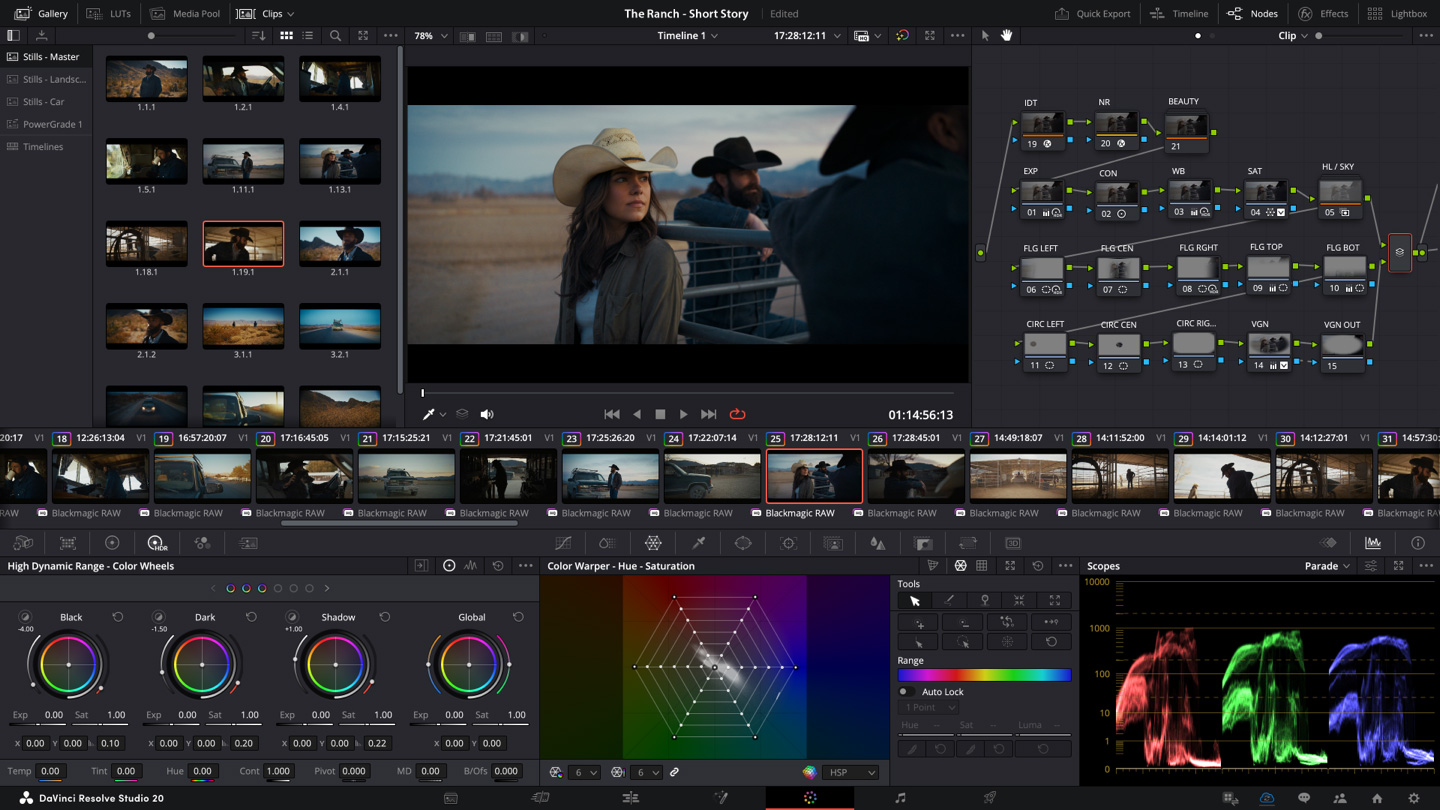
Let’s address the elephant in the room: the node-based workflow. For those coming from Premiere or Final Cut, the first time you look at the Color or Fusion page, it looks like a wiring diagram for a nuclear reactor. But here’s the thing—once it clicks, it’s a religious experience.
Nodes reward structural thinking. Instead of "baking in" effects on a linear timeline, you’re building a flow. Want to isolate a skin tone, add a parallel mask for the background, and then apply a global film grain? In a layer-based system, that’s a nightmare to manage. In Resolve, it’s a visual map. You see the "how" of your creative process. It feels surgical. In version 20, this has only become more refined. The UI is cleaner, the snappiness of the "Smart Hub" on the Cut Page makes multicam editing feel like playing a video game, and the tactile feedback—especially if you’re using a Micro Color Panel—creates a "flow state" where the software just disappears.
The "Practical AI" Revolution
We’ve all seen the AI hype that promises to "generate a movie from a text prompt." That’s fun for five minutes, but it doesn’t help me hit a 6:00 PM deadline. Blackmagic’s approach to AI is different. They call it the DaVinci Neural Engine, and in 2026, it’s basically a personal assistant who doesn’t sleep.
The Magic Mask is the star of the show. I remember the days when isolating a moving subject meant frame-by-frame rotoscoping that would make you want to throw your monitor out the window. Now? You stroke across a person’s arm, and the AI tracks it with terrifying precision across 8K frames. It even understands depth. The Depth Map feature allows you to literally "reach into" a flat image and add fog or lighting behind a subject without a green screen. It’s not just "magic"—it’s a production bottleneck killer.
Hardcore Features & Professional Support
What separates a "video editor" from a "post-production suite" is the depth of the tools you actually use when things get difficult. Here’s what makes Resolve 20 a beast:
-
The Universal iPad/Desktop Bridge: This isn't a "lite" version. The iPad Pro version now supports almost everything the desktop does. You can start a grade on the bus and finish it on a $30,000 reference monitor without ever "exporting" a project file. You just move the SSD.
-
Intelligent Audio Transcriptions: Fairlight (the audio page) has caught up to the AI wave. You can now edit your video by simply deleting words in a generated text transcript. It’s a documentary editor’s dream.
-
Neural Voice Isolation: This is the best in the business. I’ve taken footage shot next to a literal construction site and extracted clean, "studio-quality" dialogue with a single slider.
-
Blackmagic Cloud Collaboration: This is where it gets spooky. You can have an editor in London, a colorist in LA, and a sound designer in Tokyo all working on the exact same timeline at the same time. No more "Final_v2_REAL_FINAL.drp" files.
-
Surface-Agnostic Tracking: The new Point Tracker is rock solid. It doesn’t matter if your subject is obscured or the lighting changes; it sticks like glue.
-
HDR Mastering Tools: With 2026’s focus on high-brightness displays, Resolve’s HDR palette gives you granular control over the roll-off that other NLEs simply can’t match.
The "Reality Check" (The Stuff the Manual Won't Tell You)
It’s not all sunshine and rainbows. Resolve is a demanding partner. If you’re trying to run this on a base-model laptop from three years ago, don't bother. It wants VRAM. It wants a beefy GPU. It wants to eat your hardware for breakfast.
And let's talk about the learning curve. Fusion (the VFX page) is still an absolute mountain to climb. It is incredibly powerful—capable of Hollywood-level compositing—but it is not intuitive for a beginner. You will spend hours on YouTube. You will get frustrated. You will wonder why simple text animations require five nodes. But that’s the trade-off for having no "ceiling" on your creativity.
Also, Blackmagic’s update process is still weirdly old-school. Every time there’s a minor update, you have to download a 3GB installer and reinstall the whole app. In 2026, why aren't we doing delta updates in the background?
The Post-Production Audit
| The Good Stuff (Pros) | The Headaches (Cons) |
| Color Science: Still the gold standard. There's a reason every Marvel movie passes through this software. | Steep Curve: If you’re coming from a simple editor, the Fusion and Fairlight pages will make your head spin. |
| One-Time Buy: $295 for Studio. No monthly "subscription tax." This is the best value in tech, period. | Hardware Hunger: You need serious GPU power for 4K/8K workflows. Don't bring a knife to a gunfight. |
| AI That Actually Works: Magic Mask and Voice Isolation save days of manual labor. | The "Full" Update: Still requires a massive download for every tiny patch. |
| Cloud Workflow: Real-time global collaboration is now seamless and reliable. | iPad Limitations: While powerful, the iPad version still lacks the dedicated "Edit" page utility of the desktop. |
2026 Reality Check: Final Grades
-
User Experience (Pro-Level): 9.2/10
-
AI Innovation: 9.5/10
-
Platform Synergy: 9.0/10
-
Value for Money: 9.8/10
-
Overall Grade: A+
DaVinci Resolve 20 is the tool you choose when the quality of the image is non-negotiable. It is an uncompromising suite that has successfully integrated AI to handle the drudgery, leaving the creative vision entirely in your hands. In a world of "fast-food" video content, Resolve remains the fine-dining kitchen of the industry—complex, demanding, but capable of producing absolute masterpieces.